Showing posts with label Java ME. Show all posts

Sunday, March 14, 2010

OMLDSuite - Opera Mini on the PC as a One-Click-Solution

Hi,

this is what you've been waiting for. Now you can have OperaMiniLargeDevice (OMLD) (see previous posts) as a one-click-solution (OMLDSuite) to let Opera Mini run on the PC in a big window. This browser is now also available for the iPhone, Blackberry, Windows Mobile and numerous other mobile platforms. It offers a fast browsing experience due to advanced content compression techniques. The new OMLDSuite consists of three components:
  • an emulator from the JavaFX SDK (adapted for OMLDSuite)
  • Opera Mini 5 beta 2
  • scripts to install and start Opera Mini
Follow the next steps in order to use OMLDSuite on your computer.

Requirements:
  • Windows XP, Vista or Windows 7
  • Java Runtime Enviroment from here
  • Internet access on your PC
Downloading OMLDSuite:

I have made several versions of OMLDSuite for different screen resolutions. Feel free to download the version which suits your needs:
Installation and running OMLDSuite:
  • Unpack the OMLDSuite archive you just downloaded in one directory.
  • Run the script "install_opera_mini.bat" by clicking on it. This is only needed once!
  • Then click on the script start_opera_mini.bat" whenever you want to start OMLDSuite.
  • Then the emulator window should come up in which you can launch Opera Mini (5).
As this new solution does not need the Sun Wireless Toolkit or the Java ME Platform SDK 3.0 or the JDK the installation is now much simpler.

Best
Makube


Saturday, February 28, 2009

MobTorrent - A BitTorrent client for Java ME

Hello,

I recently came across the first BitTorrent client for Java ME, called MobTorrent. You can find it and its source on this page. Although it still has some bugs like the OutOfMemory-Exceptions that occur sometimes, it is a very good start for implementing the Bittorrent protocol based on the Java ME platform. I wonder, when the first Gnutella client for Java ME will be released :-)

Best
makube


Thursday, January 1, 2009

MeRadio - A Shoutcast Radio Streaming Client for Java ME

Hello,

a new year and a new project. This time it's a Shoutcast radio streaming client for Java ME, which I started as a hobby project. I called it MeRadio. Inspired by this post to stream Shoutcast streams to the IPhone, I wanted to make such an application (MIDlet) for Java ME (J2ME). Here it is in an initial version:

The download package (links below) contains:
- a server part which consists of three files: meradio.php5, mr.xml and php.ini
- the mobile application MeRadio (Nokia and Sony Ericsson version) with its source

The Server

The file meradio.php5 has two main functions: First it delivers the radio stream URLs from mr.xml to the mobile application, second it streams the plain audio data (mp3) of a radio station to the mobile application, while stripping off useless Shoutcast headers, which cannot be understood by Java ME.

When you want to install this server on your webspace, php must be supported. Maybe the php.ini is also needed, which sets the property "allow_url_fopen = on". This is needed for customers of 1und1. And maybe the file extension php5 doesn't work for you. Then you should rename meradio.php5 to meradio.php. The file mr.xml is an XML formatted document containing some predefined radio stations mostly taken from the radio list of Ninj's Virtual Radio Symbian application (http://www.ninj.com/vradio/vr_list.xml). Put all 3 files into the same directory of your webspace.

Test the service using a webbrowser:
- Get the radio list using this URL: http://yourhostname/meradio.php5?rlist=1
- Hear the stream of a radio e.g.using this URL: http://yourhostname/meradio.php5?play=http://sc3.radioseven.se:8500/&clientid=123234324

The php will stop executing after 24 minutes to limit the traffic on the server and on the phone. You can adjust this value according to your needs.

The Mobile Application

Select the Nokia or Sony Ericsson version of MeRadio and simply install MeRadio.jar to your Java enabled phone. During the first start you will be advised to set the URL to meradio.php5 properly. Some Nokia devices need a port number after the hostname, otherwise an invalid locator exception might be thrown. This URL can be entered in the settings menu. Then you can click on Genres, which loads the genres (and radios) from the mr.xml file using meradio.php5. This may take some seconds, especially on Sony Ericsson phones. Then you can choose a genre and select a radio stream of interest. Now you should be able to hear the selected stream with very few or even no annoying gaps that often occur on other streaming solutions based on Java ME.

Here is the download link for the current version 0.2a:

-FileFactory:
MeRadio0.2a.zip

-MegaUpload:
MeRadio0.2a.zip


Version 0.2 introduces these updates:
- Radio list is persistently saved in the RMS (radio list doesn't need to be fetched from the server everytime the MIDlet starts)
- Radio list can be updated when necessary
- Different versions of MeRadio for Nokia and Sony Ericsson phones, as these devices support different streaming mechanisms
- Small updates to meradio.php5 and new radios (Techno) in mr.xml

I have successfully tested MeRadio on a Sony Ericsson W850i and on a Nokia 3120 classic phone (S40). You can change the source as you wish and play with it. Bug reports are always welcome as this is a new project.

Have fun with it and a happy new year
Makube

PS.:
Here are the download links for the old versions:

Version 0.2:

- FileFactory: MeRadio02_all.zip

- MegaUpload: MeRadio02_all.zip

Version 0.1:

- FileFactory: MeRadio01_all.zip

- MegaUpload: MeRadio01_all.zip


Thursday, January 3, 2008

Opera Mini as a PC Browser (big screen)

Hi,

a new version of OperaMiniLargeDevice (OMLD) for the new Java Platform Micro Edition Software Development Kit 3.0, which is compatible with the new Opera Mini 5, has been published here. OMLD for the older Sun WTK, which is the topic of this post, will stay online, as it is also compatible with Linux and many users have installed this solution already.

Now the original post:

Today I have worked on a solution to make the famous mobile browser Opera Mini run in a big window on the PC. The reason for this is the fast browsing experience on mobile devices with this application and the small amount of traffic it generates during browsing sessions, because the Opera Mini proxy reduces page sizes. It is now also available for the iPhone, Blackberry, Windows Mobile and numerous other mobile platforms. So also PC users could benefit from using this browser, especially from version 4 that introduces fullscreen support.

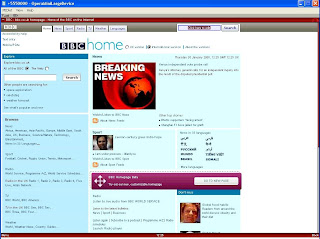
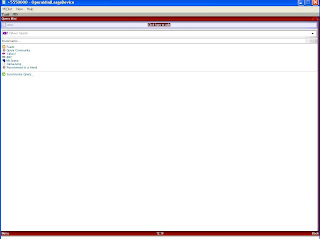
Because Opera Mini is a Java ME application, an emulator is necessary. Therefore, I used the Sun Java Wireless Toolkit with the included MIDP emulator. Then I adapted the preinstalled "QwertyDevice" and made a new emulator device template, the "OperaMiniLargeDevice" (OMLD), with the usable screen size of 1200x705 pixels. I omitted the usual control buttons of the standard emulators to have more space for the browser.

Here are two pictures of what the result looks like.
OperaMiniLargeDevice is now available in 4 variants for different screen resolutions. So if you want to test the solution yourself you should follow the next steps:

Requirements:
  • Get the Java SE Development Kit (JDK) from here.
  • Get the Sun Java Wireless Toolkit 2.5.2 for CLDC from here.
  • Get the "OperaMiniLargeDevice" for Sun Java Wireless Toolkit from here.
  • Get Opera Mini Browser 4.2 from here. Be sure to download both the JAD and the JAR to the same directory. The generic advanced version is recommended.
  • Internet access on the PC
Installation (done for Win XP):
  • Install the JDK.
  • Install the Wireless Toolkit.
  • Unzip your downloaded version of "OperaMiniLargeDevice" (simply extract it, a directory will be created automatically). Copy this directory to Path-to-WTk\wtklib\devices\ . The complete path to OMLD on my machine looks as follows: "C:\WTK2.5.2\wtklib\devices\OperaMiniLargeDevice1024x705".
  • Then choose "OperaMiniLargeDevice" as the default device, e.g. via "Start->All Programs->Sun WTK->Default Device Selection".
  • Then use "Start->All Programs->Sun WTK->Run MIDP Application" to start Opera Mini via its JAD file.
  • The start screen should appear and you should now be able to launch Opera Mini by pressing F2.

Remark:

It might be that you receive the following error on starting Opera Mini:

OTA server emulation started ...
HTTPS server emulation started ...
Error: Reason = 36

The most obvious reason for this error is that the "MIDlet-Jar-URL" in the JAD does not point to the right JAR file. Try to open the JAD with a text editor, locate the property "MIDlet-Jar-URL" and make sure that ONLY the filename of the JAR is left in this entry, e.g. MIDlet-Jar-URL: opera-mini-4.2.13918-advanced-de.jar . You must not use a complete URL to the JAR in the web. And do not forget to put the JAD and the JAR in the same directory.

Navigation:

You can set the link focus and scroll through a site with ARROW keys. The ENTER key selects an action, e.g. a text field. Texts can be entered with the normal keyboard keys. You can copy from and paste text into text fields by pressing STRG+c and STRG+v. The keys F1 and F2 control the menu actions of Opera Mini and the emulator, e.g. security questions for internet access. Since version 0.5 you can use your mouse to control Opera Mini and to click on links.

Hope you find this solution helpful. Any tips to improve this solution are welcome.

Greetings Makube

PS.:

Update to version 0.6 (see this post):
  • Shortcuts in Opera Mini usable
  • Speed dial in Opera Mini usable
  • Special version for netbooks and UMPCs like the Asus EEE or the HTC Shift available
Update to version 0.5 (Major update):
  • Screensize enlarged to 1200 x 705 from 1024x705
  • Mouse can be used to control Opera Mini and to click on links
  • Escape-key does not accidentially close the emulator anymore
Update to version 0.2:

I updated "OperaMiniLargeDevice" to version 0.2 because the first version triggered annoying keyRepeatEvents on some websites, resulting in not being able to focus links. Therefore the property keyRepeatEvents is now set to false. Happy browsing!