Hi,
a new version of OperaMiniLargeDevice (OMLD) for the new Java Platform Micro Edition Software Development Kit 3.0, which is compatible with the new Opera Mini 5, has been published
here. OMLD for the older Sun WTK, which is the topic of this post, will stay online, as it is also compatible with Linux and many users have installed this solution already.
Now the original post:
Today I have worked on a solution to make the famous mobile browser Opera Mini run in a big window on the PC. The reason for this is the fast browsing experience on mobile devices with this application and the small amount of traffic it generates during browsing sessions, because the Opera Mini proxy reduces page sizes. It is now also available for the iPhone, Blackberry, Windows Mobile and numerous other mobile platforms. So also PC users could benefit from using this browser, especially from version 4 that introduces fullscreen support.
Because Opera Mini is a Java ME application, an emulator is necessary. Therefore, I used the Sun Java Wireless Toolkit with the included MIDP emulator. Then I adapted the preinstalled "QwertyDevice" and made a new emulator device template, the "OperaMiniLargeDevice" (OMLD), with the usable screen size of 1200x705 pixels. I omitted the usual control buttons of the standard emulators to have more space for the browser.
Here are two pictures of what the result looks like.
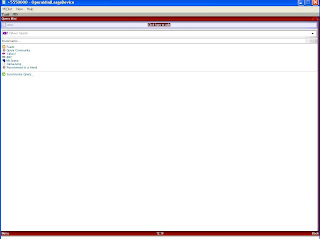
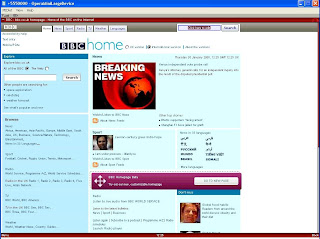
OperaMiniLargeDevice is now available in 4 variants for different screen resolutions. So if you want to test the solution yourself you should follow the next steps:
Requirements:
- Get the Java SE Development Kit (JDK) from here.
- Get the Sun Java Wireless Toolkit 2.5.2 for CLDC from here.
- Get the "OperaMiniLargeDevice" for Sun Java Wireless Toolkit from here.
- Get Opera Mini Browser 4.2 from here. Be sure to download both the JAD and the JAR to the same directory. The generic advanced version is recommended.
- Internet access on the PC
Installation (done for Win XP):
- Install the Wireless Toolkit.
- Unzip your downloaded version of "OperaMiniLargeDevice" (simply extract it, a directory will be created automatically). Copy this directory to Path-to-WTk\wtklib\devices\ . The complete path to OMLD on my machine looks as follows: "C:\WTK2.5.2\wtklib\devices\OperaMiniLargeDevice1024x705".
- Then choose "OperaMiniLargeDevice" as the default device, e.g. via "Start->All Programs->Sun WTK->Default Device Selection".
- Then use "Start->All Programs->Sun WTK->Run MIDP Application" to start Opera Mini via its JAD file.
- The start screen should appear and you should now be able to launch Opera Mini by pressing F2.
Remark:
It might be that you receive the following error on starting Opera Mini:
OTA server emulation started ...
HTTPS server emulation started ...
Error: Reason = 36
The most obvious reason for this error is that the "MIDlet-Jar-URL" in the JAD does not point to the right JAR file. Try to open the JAD with a text editor, locate the property "MIDlet-Jar-URL" and make sure that ONLY the filename of the JAR is left in this entry, e.g. MIDlet-Jar-URL: opera-mini-4.2.13918-advanced-de.jar . You must not use a complete URL to the JAR in the web. And do not forget to put the JAD and the JAR in the same directory.
Navigation:You can set the link focus and scroll through a site with ARROW keys. The ENTER key selects an action, e.g. a text field. Texts can be entered with the normal keyboard keys. You can copy from and paste text into text fields by pressing STRG+c and STRG+v. The keys F1 and F2 control the menu actions of Opera Mini and the emulator, e.g. security questions for internet access. Since version 0.5 you can use your mouse to control Opera Mini and to click on links.
Hope you find this solution helpful. Any tips to improve this solution are welcome.
Greetings Makube
PS.:
Update to version 0.6 (see
this post):
- Shortcuts in Opera Mini usable
- Speed dial in Opera Mini usable
- Special version for netbooks and UMPCs like the Asus EEE or the HTC Shift available
Update to version 0.5 (Major update):
- Screensize enlarged to 1200 x 705 from 1024x705
- Mouse can be used to control Opera Mini and to click on links
- Escape-key does not accidentially close the emulator anymore
Update to version 0.2:
I updated "OperaMiniLargeDevice" to version 0.2 because the first version triggered annoying keyRepeatEvents on some websites, resulting in not being able to focus links. Therefore the property keyRepeatEvents is now set to false. Happy browsing!


